The goal of this task is to automatically collect all cookbook recipes in one project note using file properties.
Step 1: Create a Project Hub Note
- Create a folder called
projects - Inside it, create a project hub note called
project_cookbookor something similar - Add the following basic structure to the note:
# Description

- Create a small cookbook using my recipes

# Recipes
Step 2: Add a project property to recipes
- Open 2–3 recipe notes
- Add a new property to the note
- Click on the 3 dots on the top right of the recipe note
- Find the option “Add file property” (see screenshot below)
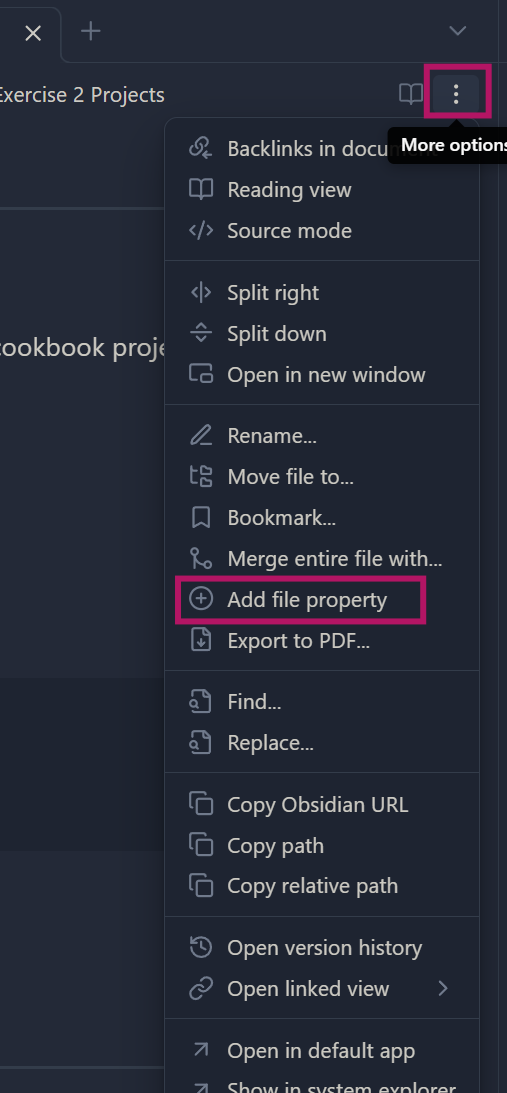
- Add a new property called “project” and give it the value “cookbook”. It should look like this:

Important:
- The property name (
project) must be the same everywhere - The value (
cookbook) must be spelled exactly the same
Step 3: Collect recipes automatically with Base
- Go back to your project hub note
project_cookbook - In the
# Recipessection, insert an empty “Base” block:
```base
```- After inserting the block, the Base interface will appear automatically
- In the Base interface that will appear, use the “Filter” button
- Files where
projectiscookbook - It should look like this:
- Files where
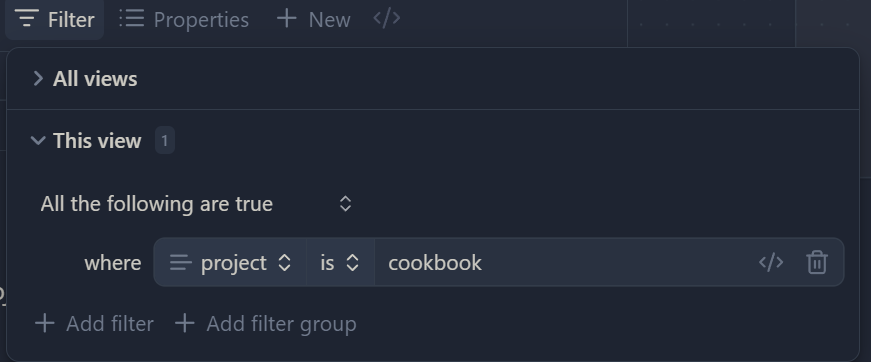
You should now see your recipes listed automatically.
Optional tasks (for the fast ones)
You can do these in any order or skip them and take a break.
Add other properties
- Add another property to recipes (e.g.
course,difficulty, …) - Update the Base view to display this property
- Use the Properties button in the Base interface
- Find and select your new property and see it appear in the list