Download and open the demo vault
You can download the demo vault for the workshop here:
Download demo vault
The demo vault contains templates and example workflows for:
- Daily notes and tasks
- Project hub notes and Obsidian Bases
- Zettelkasten
- Reference notes with Zotero
- Reference notes with the Obsidian Web Clipper
Open the demo vault in Obsidian
Follow these steps to open the vault on your computer.
Step 1: Download and unzip
- Download the demo vault ZIP file.
- Unzip it (Right-click → Extract / Unzip).
- You should now see a normal folder called something like
notebook_demo.
Step 2: Open the vault in Obsidian
- Open Obsidian.
- In the bottom left corner, click Manage vaults.
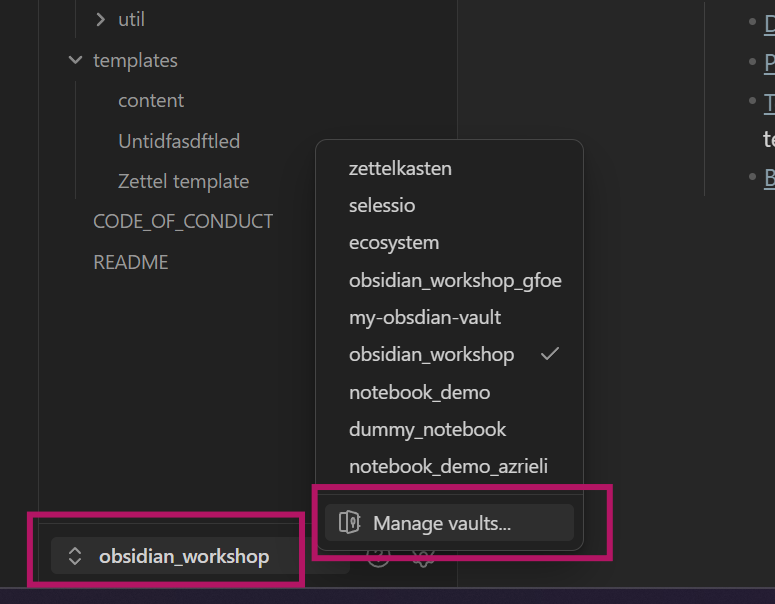
- Click Open folder as vault.
- Select the unzipped demo vault folder you just downloaded.
- Click Open.
The demo vault will now open in Obsidian.
Start here
Open the README note first.
It contains links to all relevant workflow examples and templates inside the vault.
How to use the demo vault
The demo vault is a reference and a toolbox meant for inspiration.
- Open it next to your own vault
- Copy templates or small parts you like
- Follow workflows step by step
- Ignore everything that doesn’t fit your workflow